
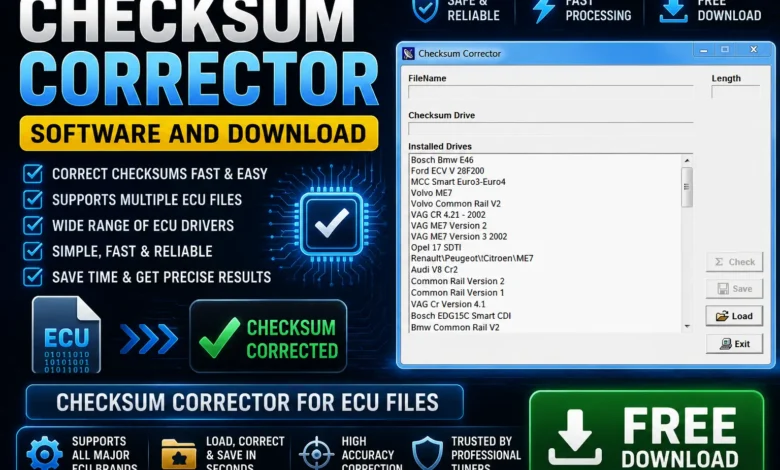
Imagine you are standing inside your professional tuning shop in Houston, Texas or Los Angeles, California, working hard on remapping a customer’s Ford F-150 EcoBoost or Chevy Silverado to increase its horsepower. After spending hours precisely adjusting the ignition maps inside WinOLS, you finally write the modified binary file into the Electronic Control Unit (ECU). The customer is waiting outside, thrilled to test the new power. You turn the key, but to your horror, the engine refuses to crank, or worse, the dashboard goes completely dead. You have just encountered the ultimate nightmare of every American car tuner: a bricked computer caused by failing to use a reliable ECU Checksum Corrector software before flashing the chip. This simple oversight can cost you thousands of dollars in replacement modules, which is why utilizing a dedicated ECU Checksum Corrector software marks the definitive line between a novice hobbyist and a true professional tuner.
What is an ECU Checksum and Why Does It Cause Bricking?
When we talk about ECU remapping, chip tuning, or flashing performance tunes in the US domestic market, we are modifying crucial operating parameters inside the flash memory of the engine computer. This includes torque limiters, fuel injection timing, turbo boost pressure, and ignition maps. Every original factory software file contains an embedded security protocol known as a checksum. The primary function of this system is to verify data integrity. Upon booting up, the main microprocessor executes a sophisticated mathematical algorithm covering all bytes within the file and compares the final sum against a pre-calculated value stored securely inside the software. This is precisely why having a reliable ECU Checksum Corrector software setup in your shop is absolutely critical.
If you alter even a single byte of data to increase horsepower or delete a code without using an ECU Checksum Corrector software to update the corresponding checksum value to reflect that specific change, the microcontroller identifies the file as corrupted or modified by unauthorized third-party apps. As an immediate safety measure, the ECU enters a permanent lockout state, commonly referred to in the automotive programming industry as a “bricked” state. At this stage, the module will reject any diagnostic communication, command requests, or OBD2 scan tools, leaving the vehicle entirely immobilized until a proper ECU Checksum Corrector software calculation is applied to fix the underlying binary structure.
Flashing Hardware vs. Standalone Software: Who Handles the Correction?
One of the most frequent questions debated among upcoming tuners and shop technicians in the American automotive market is whether a standalone ECU Checksum Corrector software program is strictly necessary for daily operations. The precise answer relies heavily on the specific master or slave hardware tool you utilize for reading and writing the microcontrollers.
In standard configurations, genuine, high-end professional hardware flashers like MPPS, Galletto, Kess, Alientech, or advanced custom diagnostic tools calculate and fix the checksum dynamically during the flash writing process. This occurs flawlessly provided that the tool is original and the specific ECU protocol is natively supported. However, when dealing with highly customized maps, cloning software setups, using budget-tier hardware, or implementing extreme manual modifications, automatic calculators often fail to identify the precise algorithmic block. In these specific scenarios, running your bin file through an external ECU Checksum Corrector software serves as your mandatory secondary validation layer to guarantee software safety before writing. To complement your setup, you can also explore our guide on essential automotive diagnostic tools to build a fully secure workspace.
💡 Expert Field Tip: Never rely exclusively on your flashing device’s “on-the-fly” automatic checksum calculator if you are performing advanced custom tuning or track-only modifications on heavy-duty diesel trucks or high-end European imports. Always validate the modified binary file through an independent ECU Checksum Corrector software patcher to ensure that the cross-checksum hashes perfectly match factory standards before hitting the write button.
Supported ECU Generations and Complex Cryptographic Families
Professional automotive programmers in the United States deal daily with a highly diverse fleet of vehicles, ranging from domestic muscle cars and heavy-duty trucks to complex European luxury imports. Every vehicle brand implements a distinct generation of control modules, each relying on its own complex mathematical verification routines. These span from older legacy 8-bit architectures to modern 32-bit platforms featuring advanced RSA digital signatures. This wide variety highlights why a versatile ECU Checksum Corrector software is a must-have tool for any modern garage.
A comprehensive ECU Checksum Corrector software package provides extensive support for a broad spectrum of these module families. This includes older legacy diesel systems like MSA15, widely used common-rail platforms including EDC15 and EDC16, as well as highly prevalent petrol variants from Bosch, such as the ME7 and ME9 series, making the right ECU Checksum Corrector software incredibly versatile for daily use.
Comprehensive Hardware Compatibility and ECU Verification Matrix
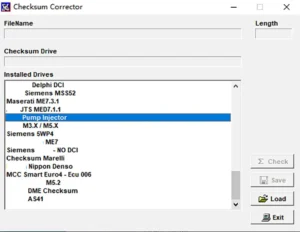
The following detailed technical table outlines the extensive cross-compatibility of the checksum correction algorithms across various automotive brands, injection types, and engine management controllers supported by standard ECU Checksum Corrector software options:
| Automotive Brand / Manufacturer | Supported ECU Model & Protection Profile |
|---|---|
| Bosch (BMW / Euro Imports) | BMW E46 / BMW Bosch ME7 / BMW M5.2 / Bosch DME Checksum |
| Ford Motor Company (US Domestic) | Ford ECV V 28F200 / Siemens Ford-NO DCI / Bosch AS41 |
| VAG (Audi, VW) | VAG CR4.21-2002 / ME7 Version 2 & 3 2002 / Audi V8 Cr2 / Pump Injector |
| Volvo Car Group | Volvo ME7 / Common Rail V2 & V3 / Siemens Volvo MS |
| Opel / GM Euro | Opel 17 SDTI / Simtec 56 / Siemens Simtec 70-90 / Bosch MEXX / M1.5.5 |
| PSA & Renault | Renault/Peugeot/Citroën ME7 / Siemens Hdi / Siemens RE55 / Delphi DCI |
| BMW Performance Series | BMW Edc16 Diesel / Common Rail BMW V2 / Siemens MS42 & MS43 / Siemens Mss52 |
| Mercedes-Benz / Smart | Mercedes Siemens 5WK9 / Temic V52-V59 / Smart MCC Euro3-Euro4 / Bosch EDG15C Smart CDI |
| Italian Performance (Alfa, Fiat, Maserati) | Alfa ME7 Euro3 / Fiat Bosch ME7 Euro2-Euro3 / Maserati ME7.3.1 / Alfa JTS MED7.1.1 / Checksum Marelli |
| Exotic Supercars (Ferrari, Porsche) | Ferrari F360 Modena ME7.3 / Porsche Bosch ME7.8 |
| Japanese Imports (Nissan, Mazda) | Nissan Common Rail V2 / Mazda Nippon Denso |
| General Motors & Chrysler | GM Delco Multec / Chrysler CR Ver 2.0 / Bosch Valvetronic ME9 |
Step-by-Step Guide to Applying ECU Checksum Corrections Correctly
Modifying engine flash maps safely demands exceptional attention to detail and organized workflows. Below is the field-tested operational procedure used inside top-tier American performance centers to ensure file integrity using your chosen ECU Checksum Corrector software:
- Extract the Original Base File (Original File – Ori): Properly connect your professional interface hardware device to the vehicle’s OBD-II port, or arrange the wire pinouts via Bench Mode. Download the raw factory flash dump and save it as a master backup copy.
- Modify Target Maps (Map Tuning): Load the original binary file into specialized editing software like WinOLS or TunerPro. Perform your custom modifications on target values, such as spark advance or fuel enrichment curves.
- Import the Modified Binary to the Corrector: Launch your dedicated ECU Checksum Corrector software, and import the newly edited binary file (Modified File – Mod).
- Select Your Engine Control Architecture: From the software’s structural library, pick the exact matching ECU family (for example: Bosch ME7.8 for a Porsche or EDC16 for a common-rail diesel application) within the ECU Checksum Corrector software interface.
- Execute Verification and Save: Click on the “Correct Checksum” function. The ECU Checksum Corrector software instantly processes the modified blocks, compares hex arrays, and patches the new balance bytes. Export the corrected file smoothly.
- Write with Full Safety (Flashing Phase): Upload the finalized file back into the car computer using your preferred programmer. Your computer will recognize it smoothly without throwing internal errors.
The Evolution of Protections: Legacy 8-Bit Blocks vs. Modern Cryptographic Signed RSA Matrices
In older engine management platforms, such as the Bosch M1.5.5 or typical legacy 8-bit microcontrollers found in older domestic cars, calculating data authenticity was straightforward. The routine summed up the hex values across the entire memory map, and appended the remaining bits into a tiny balance byte at a dedicated address. Correcting these files takes fractions of a second using elementary ECU Checksum Corrector software patches.
Conversely, modern vehicle platforms utilizing advanced Siemens/Continental units, complex Infineon Tricore microprocessors, or high-end Bosch MD1/MG1 series feature extensive multi-layered layers of protection. These setups rely heavily on RSA digital signature keys and cryptographic hash algorithms. Instead of a basic sum verification, the main processor validates the data signature against a public key embedded by the vehicle manufacturer. This reality highlights why professional tuners must regularly update their standalone ECU Checksum Corrector software options to integrate cutting-edge algorithms capable of unlocking these advanced security matrices cleanly.
Download ECU Checksum Corrector Software for PC
If you are looking for an independent, dedicated utility tool to analyze, fix, and update checksum values for the multiple vehicle electronics and module families listed in our compatibility chart, you can download the full standalone ECU Checksum Corrector software package directly via the secure link below:
Download ECU Checksum Corrector Tool Free
Unzip Password: No Password
Frequently Asked Questions Regarding ECU Checksum Correction (FAQ)
Q1: Does WinOLS fix checksum parameters automatically without separate ECU Checksum Corrector software?
Yes, WinOLS has the native capability to check and correct data hashes, but it does not provide this functionality out-of-the-box in basic free versions. It requires purchasing premium individual modules called Checksum Plugins. If you don’t own the specific plugin for the car family you are mapping, you will absolutely need to rely on a separate external utility like an ECU Checksum Corrector software to handle the file validation manually.
Q2: What is the recovery process if an ECU bricks due to a wrong checksum mismatch?
If the engine computer drops communication completely via the standard OBD-II diagnostic port due to a lack of proper ECU Checksum Corrector software validation, you must transition to advanced recovery strategies using Boot Mode or Bench Mode. This requires carefully opening the physical metal enclosure of the ECU, linking connection wires directly to the motherboard layout or boot pins, and utilizing deep-level programmers to rewrite a full factory backup dump file to restore the chip.
Q3: Is airbag module checksum calculation different from engine computers?
Yes, the hashing algorithms, block structures, and memory addresses differ dramatically between an engine ECU, an airbag SRS control module, and a transmission control module (TCM). While the overarching engineering principle remains identical preventing data corruption and unauthorized tampering each component relies on its own proprietary verification system, meaning an engine-specific ECU Checksum Corrector software might not process airbag files properly unless explicitly stated.
Q4: How can I confirm if my master flasher supports automated verification?
When you prepare to flash your modified file, professional tools run a quick diagnostic scan and display an on-screen prompt stating: “Checksum correction supported by tool. Correcting…”. If your device displays a warning note indicating that the algorithm is unrecognized or shows an unverified question mark icon, stop immediately. Correct the file manually using an external ECU Checksum Corrector software application before pushing it to the hardware.
In summary, mastering the verification of data arrays is the definitive safety layer for any modern engine remapping workflow. Taking the time to properly process files through an external ECU Checksum Corrector software prevents expensive component replacements and protects your business reputation across the tuning community. To expand your knowledge on the fundamental math, data validation structures, and computing history behind these calculations, explore the scientific breakdown of the Checksum concept on Wikipedia to elevate your engineering skills to the next level.