
VAG Dash Editor (24C32 & 24C64) V7.3 EN – The Ultimate Dashboard Programming Tool for VAG Vehicles

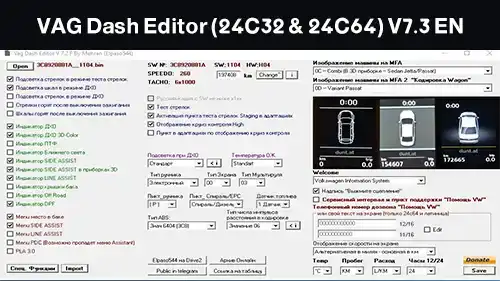
What Is VAG Dash Editor and Why Do Professionals Use It?
In today’s automotive world, electronic systems dominate nearly every aspect of a vehicle’s operation. From the engine to the instrument cluster, modern cars rely heavily on programmable electronic modules.
For technicians and tuners who specialize in VAG Group vehicles (Volkswagen, Audi, Skoda, Seat), one of the most essential tools in their toolkit is the VAG Dash Editor (24C32 & 24C64) V7.3 EN.exe.
This powerful software allows users to read, edit, and write dashboard data directly from EEPROM memory chips. Whether you need to correct mileage, synchronize IMMO data, or replace instrument clusters, this tool provides everything you need in a single, compact solution.
What Is the VAG Group and Why Does It Require Special Diagnostic Tools?
The VAG Group — short for Volkswagen Auto Group — includes several well-known European brands:
- Volkswagen (VW)
- Audi
- Skoda
- Seat
These brands are known for their advanced electronic architecture and secure communication protocols. Unlike older vehicles, most modern VAG cars use encrypted EEPROM chips inside their dashboards and ECUs to store critical data like VIN numbers, mileage, and IMMO (immobilizer) information.
That’s where VAG Dash Editor becomes essential. It’s specifically designed to work with the 24C32 and 24C64 EEPROM chips found in most modern VAG dashboards, allowing professional technicians to make safe and precise adjustments.
Understanding 24C32 & 24C64 EEPROM Chips
EEPROM stands for Electrically Erasable Programmable Read-Only Memory, a small chip that retains vehicle data even when power is disconnected.
In VAG vehicles, these chips play a crucial role in storing odometer readings, security codes, and system parameters.
24C32 Chip
- Commonly found in older VAG dashboards (up to around 2012).
- Stores basic data such as mileage, VIN, and IMMO sync values.
24C64 Chip
- Used in newer Audi, VW, and Skoda models.
- Provides higher memory capacity and more advanced encryption for modern systems.
The VAG Dash Editor V7.3 supports both chip types seamlessly, allowing users to read, edit, and reprogram data without compatibility issues.
Key Features of VAG Dash Editor V7.3 EN
The V7.3 English version is one of the most stable and feature-rich editions of the software. Below is an overview of its most important capabilities:
| Feature | Description |
|---|---|
| Mileage Correction | Safely edit or correct odometer readings when replacing or repairing dashboards. |
| EEPROM Read/Write | Read data directly from the dashboard chip and save it before making any modifications. |
| IMMO Data Editing | Modify or clone immobilizer data between dashboards and ECUs. |
| Support for 24C32 & 24C64 | Full compatibility with the most common VAG EEPROM types. |
| User-Friendly Interface | Simple and clean layout for quick navigation and editing. |
| Checksum Auto-Correction | Automatically adjusts checksum values to prevent corruption. |
| Backup & Restore | Save original EEPROM dumps to restore later if needed. |
Whether you’re replacing a faulty dashboard or upgrading a used instrument cluster, this software gives you the flexibility and control required for professional automotive work.
How to Use VAG Dash Editor (Step-by-Step Guide)
⚠️ Important:
Use this software responsibly. Odometer tampering for fraudulent purposes is illegal in most countries.
The tool should only be used for legitimate repairs or replacements.
Step 1: Required Equipment
Before you start, make sure you have:
- A Windows PC or laptop (Windows 10/11 recommended)
- A compatible OBD2 cable (e.g., VAG-Tacho or VAG K+CAN Commander)
- The VAG Dash Editor V7.3 EN.exe software
Step 2: Connect and Read EEPROM
- Connect your OBD2 cable to the car and computer.
- Launch the VAG Dash Editor software.
- Select your car model (e.g., Audi A4, VW Passat, Skoda Octavia).
- Click “Read EEPROM” to extract the dashboard data.
- Save a backup of the original dump before proceeding.
Step 3: Modify Data
Once the data is loaded:
- Navigate to the Mileage, VIN, or IMMO section.
- Input the new values carefully.
- Use the Checksum Correction tool to ensure integrity.
Step 4: Write Back Modified Data
After making the changes:
- Click “Write EEPROM” to upload the modified data.
- Wait for the process to complete.
- Restart the car and verify the new values on the dashboard.
Is VAG Dash Editor Suitable for Beginners?
Yes, the software interface is beginner-friendly.
Even if you’re new to EEPROM programming, you can easily learn the basics with a few practice sessions.
However, it’s recommended to practice on test dumps or spare dashboards before working on actual customer vehicles.
There are many helpful tutorials and walkthroughs on YouTube explaining how to use VAG Dash Editor step-by-step.
🔗 Suggested Video:
How to Use VAG Dash Editor 7.3 for VW Passat Mileage Correction
Compatibility and Supported Vehicles
The VAG Dash Editor V7.3 EN has been extensively tested and proven to work with a wide range of vehicles from the VAG Group, including but not limited to:
- Volkswagen Golf 5 / Golf 6 / Polo / Passat
- Audi A3 / A4 / A6 / TT
- Skoda Octavia / Superb / Fabia
- Seat Leon / Ibiza / Altea
Whether you are working on older dashboards using 24C32 chips or newer ones equipped with 24C64 memory, the software ensures full compatibility. It automatically detects the EEPROM type and adjusts reading/writing parameters accordingly.
Additionally, it supports dashboards from manufacturers like VDO, Johnson Controls, and Magneti Marelli, which are commonly used in these cars.
Advantages of Using VAG Dash Editor
Here’s why VAG Dash Editor V7.3 EN stands out among other dashboard editing tools:
1. Speed and Efficiency
Unlike traditional EEPROM programmers that require chip desoldering, this software communicates through OBD, allowing quick access and modification without physical disassembly.
2. Accuracy and Safety
Checksum correction and error protection systems minimize the risk of corrupting dashboard data, ensuring reliable operation after modification.
3. All-in-One Functionality
From mileage adjustment to IMMO data cloning, you can perform multiple operations in one tool instead of juggling different software programs.
4. Wide Support and Updates
The tool receives periodic updates to expand compatibility with newer vehicles and improve performance stability.
5. Lightweight and Portable
The installer size is small, and the software runs smoothly even on low-spec computers, making it ideal for workshops and mobile technicians.
Real-World Example: How a Technician Uses VAG Dash Editor
Let’s take an example from a real automotive workshop.
A technician named Alex, specialized in VAG cars, often receives vehicles with malfunctioning dashboards.
Using VAG Dash Editor, Alex can:
- Read the original dashboard dump.
- Adjust the mileage to match the ECU after dashboard replacement.
- Copy IMMO data from the old cluster to the new one.
- Verify checksum values before final programming.
The entire process takes less than 15 minutes, saving hours compared to traditional EEPROM desoldering and manual editing.
Common Issues and Troubleshooting Tips
Even though the software is stable, users may face some common issues:
| Problem | Possible Cause | Solution |
|---|---|---|
| Software doesn’t connect | Wrong COM port or driver | Check cable driver and port settings |
| “Access Denied” error | Unsupported dashboard | Try manual EEPROM read mode |
| Corrupted data after write | Checksum mismatch | Use auto-correction option |
| Odometer not updated | Dashboard not rebooted | Turn ignition off/on and recheck |
These issues are minor and can be easily resolved by following the built-in help section or consulting VAG programming forums.
Is It Legal to Use VAG Dash Editor?
This question often arises among beginners.
The software itself is completely legal — it’s a diagnostic and programming tool designed for professional repair and maintenance.
However, using it to falsify vehicle mileage for resale purposes is illegal in most countries.
Therefore, it should only be used for:
- Replacing a faulty instrument cluster
- Correcting incorrect mileage after ECU swap
- Synchronizing dashboard data for legitimate repair reasons
Always maintain transparency and use this tool ethically.
VAG Dash Editor vs. Other Dashboard Tools
| Feature | VAG Dash Editor | VAG Tacho | CarProg |
|---|---|---|---|
| Mileage Correction | ✅ Yes | ✅ Yes | ✅ Yes |
| IMMO Editing | ✅ Full | ⚠️ Limited | ⚠️ Partial |
| EEPROM Read/Write | ✅ Yes | ✅ Yes | ✅ Yes |
| 24C64 Support | ✅ Yes | ⚠️ Partial | ⚠️ Partial |
| Interface | Simple (English) | Moderate | Complex |
| Price | 💰 Affordable | 💰 Medium | 💰 High |
From the table above, it’s clear that VAG Dash Editor V7.3 offers the best balance of functionality, user-friendliness, and affordability.
System Requirements
| Specification | Minimum Requirement |
|---|---|
| Operating System | Windows 7 / 8 / 10 / 11 |
| Processor | Intel Core i3 or higher |
| RAM | 4 GB minimum |
| Disk Space | 200 MB |
| Interface | USB OBD2 Cable (VAG K+CAN / VAG-Tacho) |
The program installs quickly and doesn’t require complex configurations. Once installed, you can begin using it immediately after connecting your interface cable.
User Feedback and Testimonials
Many technicians and enthusiasts worldwide have praised VAG Dash Editor for its reliability and versatility.
🔹 “I’ve been using this tool for over a year on VW and Audi clusters — it’s fast, accurate, and has never failed me.”
– Thomas, Automotive Programmer (Germany)
🔹 “Perfect for quick mileage adjustments and IMMO cloning. The interface is simple even for beginners.”
– Karim, ECU Repair Specialist (France)
These testimonials reflect the widespread trust this software has earned in the automotive diagnostic community.
Where to Get VAG Dash Editor V7.3 EN
The program is available for download in several automotive forums and trusted file libraries.
For convenience, we’ve provided a safe and verified link for our readers.
👉 Download VAG Dash Editor (24C32 & 24C64) V7.3 EN.exe
(Find the official link in the first comment or below the article.)
Conclusion
The VAG Dash Editor (24C32 & 24C64) V7.3 EN.exe is much more than just a dashboard editing tool — it’s a comprehensive professional solution for every automotive programmer and technician dealing with VAG vehicles.
With its seamless integration, safety features, and powerful EEPROM editing capabilities, it simplifies even the most complex dashboard operations.
Whether you’re correcting mileage, cloning IMMO data, or simply exploring dashboard memory, this software delivers precision, reliability, and control at your fingertips.
If you’re serious about your automotive diagnostic work, this is a must-have tool in your digital workshop arsenal.
🔗 Download link is available in the first comment below!
And don’t forget to follow our page for more tools, software, and technical guides that make your work easier every day.
FAQs
1. What vehicles does VAG Dash Editor support?
It supports most VW, Audi, Skoda, and Seat models that use 24C32 or 24C64 EEPROM dashboards.
2. Can it edit IMMO data?
Yes, the program allows reading, editing, and cloning immobilizer data between dashboards and ECUs.
3. Do I need to desolder the EEPROM chip?
No, in most cases you can read/write directly via OBD2 without physical removal.
4. Is it compatible with Windows 11?
Yes, the software runs smoothly on all Windows versions from 7 to 11.
5. Is it free to use?
Some versions are available freely for educational purposes, while advanced features may require a license.